Plausible vs Umami: pricing for a small software team
Plausible vs Umami comes down to your tracking plan, team needs and willingness to run analytics yourself. Umami Cloud offers a free starting plan; Plausible offers a paid service after a trial, with plan upgrades for sharing and deeper analysis. Both count custom events toward hosted usage, and Umami also counts stored event properties, so compare more than your website’s pageview total.
Plausible vs Umami: which should you choose?
Choose Umami Cloud if a free start matters and one website, 100,000 monthly events and six months of history cover your needs. Choose Plausible if its dashboard and reporting suit your work and you’re ready to pay for the traffic tier and features you need. If you want to self-host either tool, assign someone to updates, backups and recovery before treating it as the cheaper option.
| Your requirement | Where to start |
|---|---|
| One small site, no hosting work, no subscription budget | Umami Cloud Hobby |
| Invite colleagues or share a Plausible dashboard | Plausible Growth |
| Custom properties or funnels in Plausible | Plausible Business |
| Several sites and up to 10 team members in Umami Cloud | Umami Pro |
| Run analytics on infrastructure you manage | Compare the self-hosted editions separately |
These choices follow the published plans below. They don’t rate either tool’s usability or tracking accuracy.
Compare monthly prices and the features you’ll actually use
The following are USD monthly prices checked on 20 November 2026. Plausible prices here use the lowest traffic tier, labelled “up to 10k monthly pageviews”; higher usage costs more.
Plausible’s pricing page lists:
- Starter: $9/month, one site, goals and custom events.
- Growth: $14/month, up to three sites and three team members, plus shared links and team management.
- Business: $19/month, up to ten sites and ten team members, plus custom properties, funnels, user journeys and Stats API access.
- A 30-day trial without a credit card.
Umami Cloud’s pricing page lists:
- Hobby: $0/month, one site, up to 100,000 events/month and six months of data retention.
- Pro: $20/month, one million events included, up to 20 sites and ten team members, and two years of retention. Extra events cost $0.00003 each.
- Business: $200/month, ten million events included, unlimited sites and team members, five years of retention, session replays and heatmaps. Extra events cost $0.00002 each.
- A 14-day trial for the paid plans.
Choose a feature level before comparing the headline prices. A solo founder who only needs traffic and a signup event has a different requirement from a team that needs shared dashboards, event properties and funnels.
Plausible’s trial includes Business features, according to its subscription documentation. Before subscribing to Starter, check whether your trial setup relies on anything that needs Growth or Business.
Count events before trusting the pageview forecast
Billable usage is the activity a provider counts toward your subscription allowance. Plausible adds pageviews and custom events across the sites in a team. Umami Cloud adds pageviews, custom events and each stored event property.
Plausible’s subscription documentation explicitly includes outbound clicks, downloads, form submissions, 404 tracking and manually tracked events. A pageview goal doesn’t add usage. Umami’s “How is usage measured?” pricing FAQ says each saved event property counts as another event.
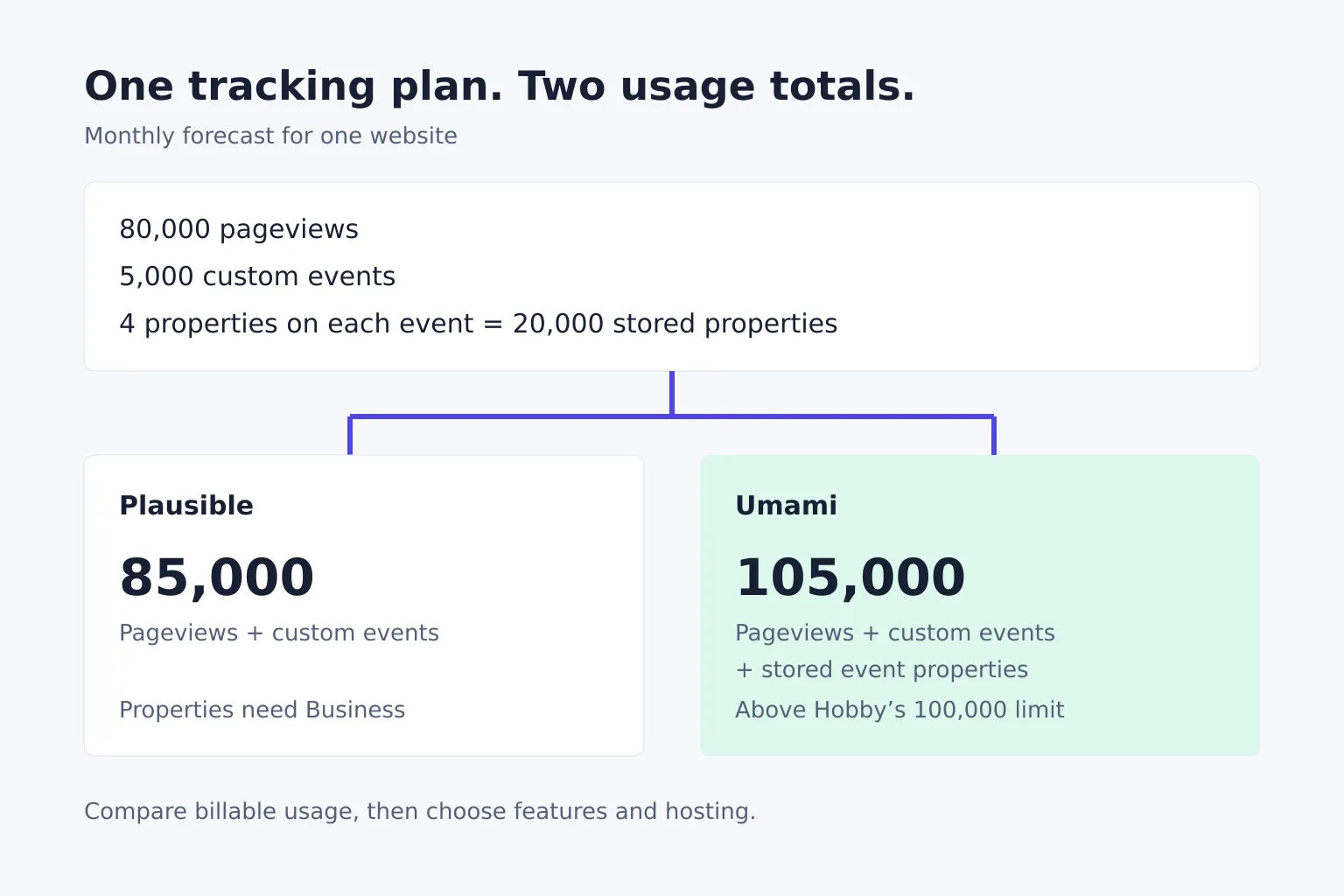
Say a fictional startup, RouteSketch, forecasts this monthly activity on one website:
- 80,000 pageviews.
- 5,000 custom events.
- Four stored properties on every custom event, such as plan, source, device group and experiment variant.
For Plausible, that is 80,000 + 5,000 = 85,000 billable units. The lowest 10,000 tier won’t cover it; keeping custom properties also requires Business.
For Umami, the properties add 5,000 × 4 = 20,000 events. Total usage becomes 105,000, above Hobby’s 100,000 allowance. Pro covers this forecast for $20/month, provided the other plan limits fit.
Without those properties, Umami usage would be 85,000 and fit within Hobby. Remove properties only when you don’t need the questions they answer; saving a subscription isn’t useful if it removes the analysis you came for.
The providers also handle excess usage differently. Plausible’s documentation says one month above the tier doesn’t require an upgrade; two consecutive months trigger an upgrade notice, with dashboards temporarily locked if you don’t upgrade within a week. Umami’s paid plans publish per-event overage rates. Budget for ongoing growth rather than relying on a one-off spike policy.
Decide who will maintain analytics and what data belongs in it
Both products have self-hosted options, but hosted plans and self-hosted editions aren’t interchangeable. Plausible’s edition comparison says Community Edition is free to self-host and some cloud features, including funnels and ecommerce revenue goals, aren’t included. Umami’s pricing FAQ says its managed service handles infrastructure, updates and maintenance, and includes cloud-only features such as email reports and the streaming API.
Before choosing self-hosting, write down who will update the service, back up its database and restore it after a failure. Include that work and infrastructure in the cost comparison.
Keep personal data out of your tracking design. Use broad event properties such as plan type rather than email addresses, customer names or private document titles. Inspect tracked URLs too: query strings can carry private values even when an event name is harmless. Review privacy obligations for your actual implementation; a cookieless analytics product doesn’t decide compliance for your whole site.
Test one decision you need analytics to support
Start with a question such as “Which referral sources bring visitors who complete signup?” Define completion as the successful signup outcome, rather than a click on the signup button.
During your trial or initial setup:
- Visit from a tagged test link and complete one signup using test data.
- Check that the source and successful signup appear where you expect.
- Repeat an action that fails, such as an invalid form submission, and make sure it isn’t counted as a completed signup.
- Check the fields and URLs being sent, then inspect billable usage before selecting a plan.
- Ask the colleague who will use the reports to answer the original question without your help.
Treat this as an implementation check, not a demand that different analytics tools produce identical totals. Document your event definitions so a report still means the same thing next month. For the campaign-link setup, use our guide to tracking directory referral traffic.
LaunchNest is our reviewed software directory. To widen your shortlist beyond these two tools, browse its website-traffic matches: the Plausible and Fathom entries are editorial selections with links to their official sources.