Tally vs Typeform for startup signup forms
For startup signup forms, choose Tally first when you need straightforward data collection with a generous free plan. Choose Typeform when its one-question-at-a-time experience fits your signup journey and you're willing to budget for the required response allowance and features. In a Tally vs Typeform decision, check expected submissions, branding and the follow-up destination before choosing by appearance.
Tally vs Typeform: which fits your signup form?
Tally is a document-style form builder: type questions and add input blocks. Typeform centres on a conversational form experience, with branching questions that adapt to earlier answers. Both can collect signup details without building a custom interface.
- Try Tally first for a compact signup form, document-style editing and free submissions subject to fair use.
- Try Typeform as well for a guided, one-question-at-a-time signup journey with a budgeted response allowance.
Branching alone isn't a reason to pay: Tally includes conditional logic in its free offering. This comparison uses published product features and plan terms, rather than a hands-on completion-rate benchmark. A form's visual style doesn't establish how many of your visitors will finish it.
Before building, write one sentence describing what happens after signup: “We send access instructions,” “We arrange a demo,” or “We notify people when an invitation is available.” Match the confirmation message to that actual next step. The guide to describing beta access helps distinguish those promises.
Compare the plan you need, not the entry price
As of 19 November 2026, Tally's pricing includes unlimited forms and submissions for free, subject to its fair-use policy. The free offering includes conditional logic, completion redirects, Google Sheets integration and webhooks. Pro costs $29 per month on monthly billing and adds removal of Tally branding, custom domains and shared-workspace collaboration, among other features.
Tally's fair-use policy gives consistently collecting 50,000 submissions per month as an example of extensive usage that may require a custom plan. Treat “unlimited” as a permissive offering with that policy attached, not a promise of unbounded capacity.
Typeform's pricing, with monthly billing selected, lists these standard plans in USD:
- Basic — $39 per month: 100 responses per month and 1 user.
- Plus — $79 per month: 1,000 responses per month and 3 users. Adds removal of Typeform branding and a custom subdomain.
- Business — $129 per month: 10,000 responses per month and 5 users. Adds drop-off rates and conversion tracking.
Typeform also offers a free plan. Check its current allowance before using it for a public launch; a free starting point doesn't establish enough capacity for your signup campaign. Annual-billing rates differ from the monthly prices above, and additional response capacity can change the cost.
The operational difference matters: Typeform's response limits apply across all forms in the account, not separately to each form. At the limit, forms enter Private mode until the next monthly cycle or an upgrade. Deleting responses doesn't restore that month's allowance.
Include feedback surveys and other live forms in your forecast. Assign someone to watch usage rather than discovering a closed form after sharing the link.
Work through a small founder signup example
Suppose a fictional product, QueueLeaf, helps small teams triage support requests. Its founder expects 120 signup responses and 30 feedback responses in the same monthly cycle, needs only one form editor and initially accepts the form builder's branding.
That is 150 expected responses across the account. Tally's free offering is a sensible first candidate. Typeform Basic's included 100 responses wouldn't cover the forecast; the founder would need to price additional capacity or consider a higher plan. Plus includes enough responses for this example, but costs $79 on monthly billing.
If removing the builder's branding becomes a requirement, compare Tally Pro at $29 with Typeform Plus at $79 on monthly billing. Those aren't equivalent products in every respect; they're the published plans that meet this particular branding requirement. A custom domain and a custom subdomain are also different features—check which link you need before buying.
QueueLeaf's initial form could contain:
- Email: where access details should go.
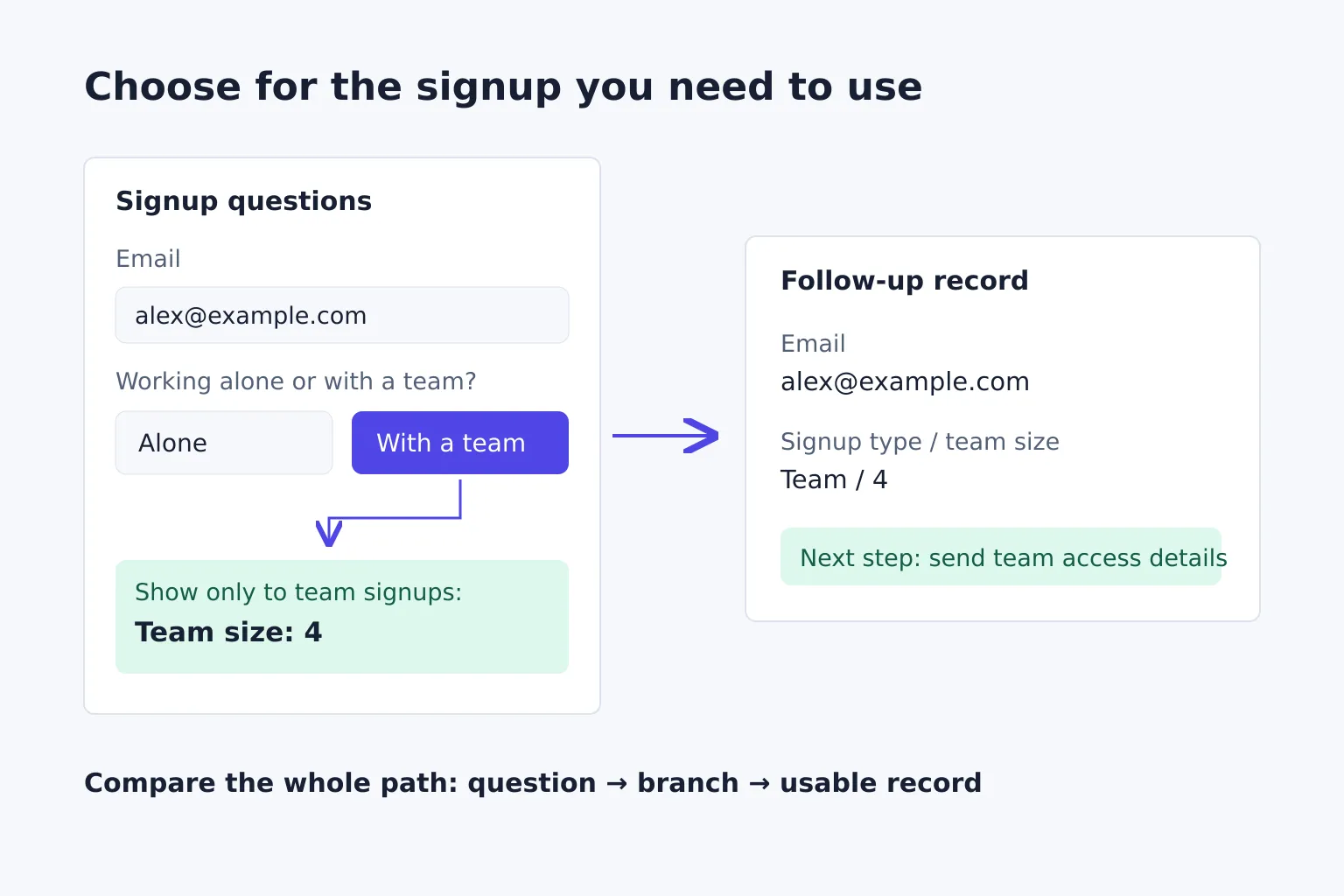
- Signup type: working alone or with a team.
- Team size: shown only when the respondent chooses a team.
- Current difficulty: an optional short answer about support triage.
The team-size branch provides a concrete reason to use conditional logic. The optional question gives context without preventing someone from requesting access. Neither path should promise immediate access if the founder is sending invitations manually.
Check whether a response becomes a usable follow-up record
Build the same short form in each candidate before committing. Use test addresses you control and synthetic answers, and allow for test submissions in any response allowance.
Check the whole signup path:
- Alone path: team size stays hidden and isn't required to submit.
- Team path: team size appears and reaches the response record with the chosen signup type.
- Correction path: changing “team” back to “alone” doesn't leave misleading team data in the final record.
- Mobile path: the form works inside your actual landing-page embed, including keyboard entry and error messages. Also open its direct link to separate an embed problem from a form problem.
- Destination: the response reaches your intended sheet, CRM or webhook consumer with the fields mapped correctly. A form-success message alone doesn't prove the integration worked.
- Confirmation: the completion screen explains the real next step. If you send a receipt or access email, check that path separately.
Choose the lowest-cost plan that passes your required paths and covers expected usage. Keep the form short until you have a reason to ask for more; don't buy a higher tier merely because an older comparison says it has more features.
LaunchNest is our software-discovery directory. Its form-tool collection brings Tally and Typeform's descriptions and official links together, with a public shortlist you can share. These are editorial selections, not owner endorsements; use the collection to keep the candidates together while you compare your signup requirements.